
Orca is a two-dimensional esoteric programming language in which every letter of the alphabet is an operator, where lowercase letters operate on bang, uppercase letters operate each frame.
Launch Orca Launch Enfer Download ROMThe application is not a synthesiser, but it is capable of sending MIDI, OSC & UDP to your audio interface, like Ableton, Renoise, VCV Rack or SuperCollider.
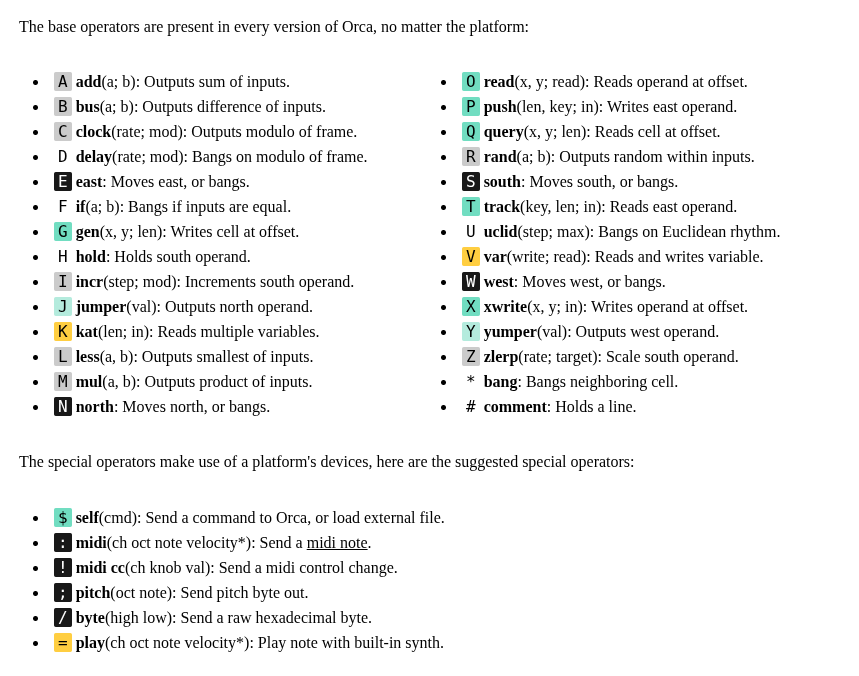
Operators
Playground
This little playground allows you to try some of the examples below. Use ctrl , to speed up, ctrl . to slow down, ctrl g to toggle the guide, and arrows to move the selection.
An introduction to basic operations

Basics
This section will teach the basics of playing a note and a sequence of notes.
Send a midi note:
- D8, will send a bang, every 8th frame.
- :03C, will send the C note, on the 3rd octave, to send C#, use the lowercase c3.
D8...
.:03C
Play a random note:
aRG, will output a random value between A & G, the rightside uppercase letter indicates an uppercase output.
D8.aRG.
.:03D..
Make a melody
04TCAFE, will create a track of 4 notes, and output its first value.
D814TCAFE
.:03A....
Play the melody
8C4, will count from 0 to 3, at 1/8th speed.
.8C4.....
D804TCAFE
.:03C....
Logic
This section will teach the basics of automating logic decisions and changing the values of operators dynamically.
Play every second note.
2I6, will increment to 6 at a rate of 2.
.2I6.......
D646TCAFEDG
.:03D......
Play a note with an offset
1AC, will add 1 to C, to output D. To get D#, use the lowercase d, like 1Ac.
D8.1AC.
.:03D..
Play a sequence back and forth
The combination of the output of C6 into B3 will bounce a value between 0 and 3 over 6 frames.
4C6......
.4B3.....
D414TCAFE
.:03A....
Play a note at a specific interval
- .I4, will increment to 4, at a rate of 1.
- .F2, will bang only if leftside input is equal to 2.
I4.....
3F2.1AC
..:03D.
Projectors
This section will teach the basics of creating new operators procedurally.
Halt a moving operator
- E, will travel further eastward, every frame.
- H, will stop a E from moving.
..H
E..
Read an operator at position
22O, will get the operator E at the offset 2,2.
22O...
..E..H
.....E
Write an operator at position
22X, will output the operator E at the offset 2,2.
22XE.
.....
.....
....E
Animate a projector
B8, will bounce between 0 and 8.
C...........
.B4.........
.1XE........
........:03C
........:03D
........:03E
........:03F
........:03G
Variables
This section will teach the basics of storing accessing and combining that stored data.
Write a variable
aV5, will store 5 in the variable a.
aV5
Read a variable
Va, will output the value of the variable a. Notice how variables always have to be written above where they are read.
....Va
.......
aV5..Va
.....5.
.......
aV6..Va
.....6.
Read 3 variables
3Kion, will output the values of i, o & n, side-by-side.
iV0.oV3.nVC
...........
3Kion......
.:03C......
Carry a value horizontally and vertically
- Y, will output the west input, eastward.
- J, will output the north input, southward.
3..
J..
3Y3
Carry a bang
This method will allow you to bring bangs into tight spots.
D43Ka...
.Y.:03C.
Base 36 Table
Orca operates on a base of 36 increments. Operators using numeric values will typically also operate on letters and convert them into values as per the following table. For instance Do will bang every 24th frame.
| 0 | 1 | 2 | 3 | 4 | 5 | 6 | 7 | 8 | 9 | A | B |
|---|---|---|---|---|---|---|---|---|---|---|---|
| 0 | 1 | 2 | 3 | 4 | 5 | 6 | 7 | 8 | 9 | 10 | 11 |
| C | D | E | F | G | H | I | J | K | L | M | N |
| 12 | 13 | 14 | 15 | 16 | 17 | 18 | 19 | 20 | 21 | 22 | 23 |
| O | P | Q | R | S | T | U | V | W | X | Y | Z |
| 24 | 25 | 26 | 27 | 28 | 29 | 30 | 31 | 32 | 33 | 34 | 35 |
Transpose Table
The midi operator interprets any letter above the chromatic scale as a transpose value, for instance 3H, is equivalent to 4A.
| 0 | 1 | 2 | 3 | 4 | 5 | 6 | 7 | 8 | 9 | A | B |
|---|---|---|---|---|---|---|---|---|---|---|---|
| _ | _ | _ | _ | _ | _ | _ | _ | _ | _ | A0 | B0 |
| C | D | E | F | G | H | I | J | K | L | M | N |
| C0 | D0 | E0 | F0 | G0 | A0 | B0 | C1 | D1 | E1 | F1 | G1 |
| O | P | Q | R | S | T | U | V | W | X | Y | Z |
| A1 | B1 | C2 | D2 | E2 | F2 | G2 | A2 | B2 | C3 | D3 | E3 |
Golf
Here are a few interesting snippets to achieve various arithmetic operations.
1X.. | Modulo Will output the modulo of 6 % 4. |
cA1. | Uppercase Will output uppercase C. |
H... | Lowercase Will output lowercase C. |
0A1. | OR Or logic gate with numeric input |
0B1. | XOR Xor logic gate with numeric input |
0B1. | XNOR Xnor logic gate with numeric input |
0M1. | AND And logic gate with numeric input |
0M1. | NAND Nand logic gate with numeric input |

Community
If you have questions about Orca, or projects to share, come and chat!
- Forum
- Discord server
- Mailing list
- IRC channel: #orca on Libera.Chat (web.libra.chat)